
Torus Knot
getting it to work with Apple's Grapher.appversion 0.1
|
|
Torus Knotgetting it to work with Apple's Grapher.appversion 0.1 |
Apple includes a 3D "Torus-knot" in the demos of its "Grapher" application. But when I reduced q, the number of lobes, the rainbow-colored tube of the knot turned into just a thin blue line. I don't know why that happens but the image below shows how I restored the tube.
The most non-obvious part for me as a beginner was that I needed to click (i.e. select) the equation on the top left first. Then click the circle-i icon (not shown, top right), or the "Inspect" entry in one of the menus.
Then the detailed settings for the graphic appear.
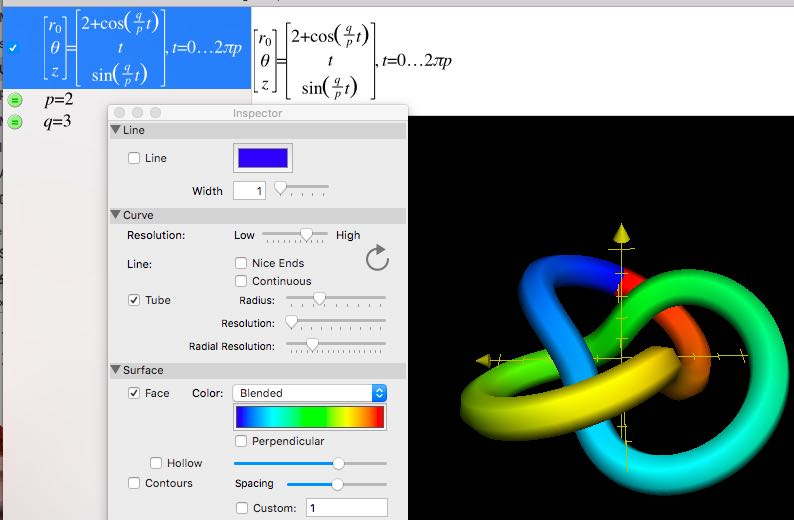
The important settings are: Line unchecked. Tube Checked. Radius up around 1/4 to 1/3 of the way. Surface -> Face checked. Color: Blended. There are choices of color map but none of them is cyclic. You can see where the red joins the blue on the knot. Hollow and Contours unchecked.
Under "Tube," the Resolution and Radial Resolution are set kinda low here to reduce the size of the "Torus_knot.gcx" file below. You can see the tube looks hexagonal like a pencil. I think it's Radial Resolution that fixes that. Gcx is the format of Grapher's files. As far as I know it's undocumented. Although Grapher was created by another company, it has that Apple attitude: treat the user like an executive who is smart enough to know what they want but doesn't want to muck about in geek details.
"without the controls and equation" ); $subst_url = array( "wander7out.gz" => "http://www.mac-guyver.com/math-fun/wander/wander7out.gz", "wandersweep.mp3" => "http://www.mac-guyver.com/math-fun/wander/wandersweep.mp3" ); echo "
';
if( isset( $subst_url[$file] ) ) $url = $subst_url[ $file ];
else $url = $file;
if( $line[0]=="d" ) {
echo "$file/";
} else {
echo "$file (${size}K)";
}
echo " | \n";
if( isset( $cmt[$file] ) ) {
echo "$cmt[$file] | \n"; } echo "
This static page was made with a
php script.
Last change
--Steve Witham
Up to my temporary home page.